QuickBooks Self-Employed vs FreshBooks: The Ultimate Guide for Freelancers
If you are a freelancer or gig worker, tax season is often a nightmare. You have receipts in your car, invoices in your email, and a vague idea of how much you actually earned.
Two tools promise to fix this mess: QuickBooks vs FreshBooks.
But here is the problem: Choosing the wrong one can cost you hundreds of dollars or leave you with a software you hate using. QuickBooks is the industry giant, but is it too complicated for a one-person business? FreshBooks looks beautiful, but is it powerful enough to handle serious taxes?
I have tested both platforms extensively for my own digital business. In this 2026 review, I will compare pricing, features, and ease of use to help you decide which one deserves your hard-earned money.
(Disclaimer: I am not a financial advisor. This review is based on my personal experience testing these tools. Some links below may be affiliate links, meaning I earn a small commission if you sign up, at no extra cost to you.)
Quick Verdict: Which One Should You Choose?
If you are in a rush, here is my bottom-line recommendation.
-
Choose FreshBooks If: You are a Service-Based Freelancer (Writer, Designer, Consultant). If you send professional invoices to clients and need to look polished, FreshBooks is unbeatable. It is easier to use and the invoices look stunning.
-
Choose QuickBooks Solopreneur If: You are a Gig Worker (Uber, DoorDash) or an E-commerce Seller (Etsy, Amazon). If you have hundreds of small transactions and need help estimating your quarterly taxes, QuickBooks is the better choice.
1. Pricing Comparison (2026 Update)
Pricing is usually the first thing we look at, but be careful. FreshBooks has a “hidden” cost that trips up many new freelancers.
Here is how the entry-level plans compare for 2026:
| Feature | FreshBooks (Lite Plan) | QuickBooks (Solopreneur) |
| Monthly Price | ~$19.00 / mo | ~$20.00 / mo |
| Client Limit | 5 Clients (Strict) | Unlimited Clients |
| Transaction Fees | Standard (2.9% + 30¢) | Standard (2.9% + 25¢) |
| Mileage Tracking | Yes (Mobile App) | Yes (Mobile App) |
| Free Trial | 30 Days | 30 Days |
When analyzing the QuickBooks vs FreshBooks 2026 pricing models, the biggest difference isn’t the monthly fee, but the client limits.
Note: Prices often fluctuate with 50% off deals, but the standard rates remain close.
The “Hidden” Cost:
Notice the Client Limit on FreshBooks. The “Lite” plan only lets you bill 5 active clients. If you get a 6th client, you are forced to upgrade to the “Plus” plan, which jumps to around $33/month.
QuickBooks Solopreneur does not limit your clients. You can have 100 clients on the $20 plan. This is a massive advantage for QuickBooks if you work with many people.
2. Interface & Ease of Use
This is where the two platforms are completely different.
FreshBooks: The “Apple” Approach
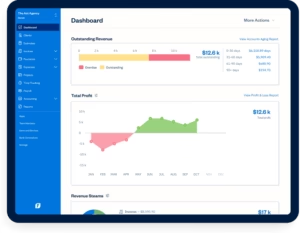
FreshBooks is designed for people who hate accounting. The dashboard is clean, white, and uses big green buttons. When you log in, you don’t feel overwhelmed.
-
The Best Part: Creating an invoice takes about 30 seconds. It feels intuitive, like using a modern iPhone app.
QuickBooks: The “Accountant” Approach
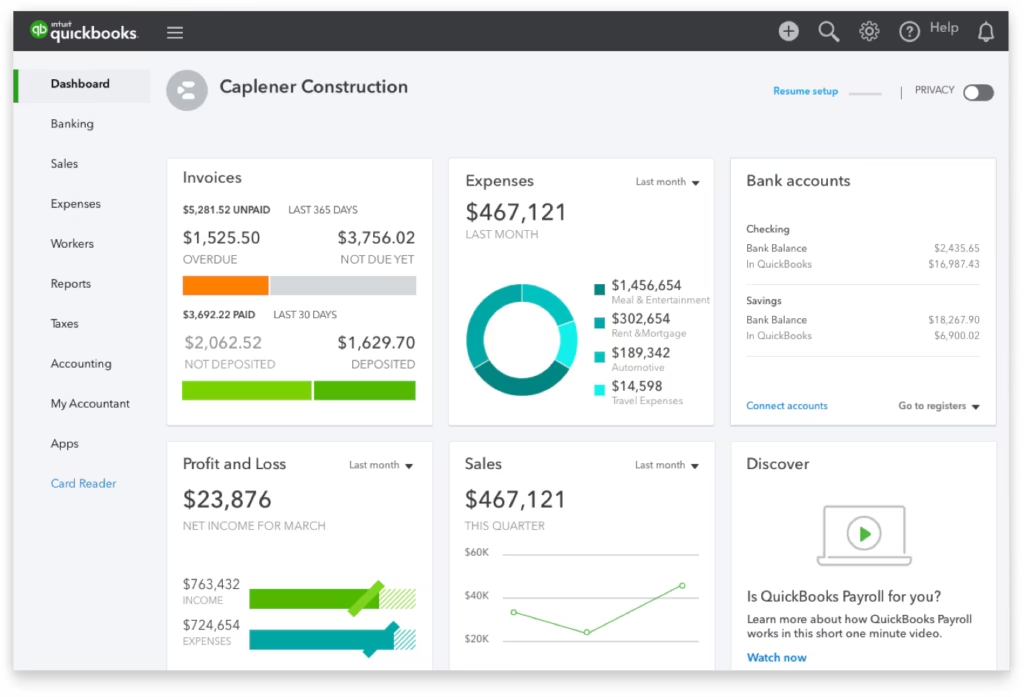
QuickBooks is powerful, but it feels like accounting software. The dashboard is full of charts, graphs, and “Profit & Loss” data.
-
The Learning Curve: It might take you a few hours to figure out where everything is. However, once you learn it, you realize how powerful it is. It gives you a much deeper view of your business health than FreshBooks does.
3. Key Feature Differences
Let’s break down the three main things you will do every day: Invoicing, Expenses, and Taxes.
[H3] Invoicing (Winner: FreshBooks)
FreshBooks was originally built just for invoicing, and it shows.
-
Customization: You can easily change fonts, colors, and banner images to match your brand.
-
The “Snooping” Feature: My favorite feature in FreshBooks is that it tells you exactly when a client opens your invoice email. No more clients lying and saying, “Oh, I never got that bill.” You see the timestamp!
QuickBooks invoices are functional but boring. You can add a logo, but you can’t make them look as “fancy” as FreshBooks.
[H3] Expense Tracking & Taxes (Winner: QuickBooks)
This is where QuickBooks destroys the competition.
-
TurboTax Integration: Since Intuit owns both QuickBooks and TurboTax, you can export your data directly to TurboTax at the end of the year. This saves hours of manual entry.
-
Quarterly Tax Estimates: QuickBooks analyzes your income in real-time and tells you: “You should save $500 for taxes this quarter.” For a freelancer scared of the IRS, this feature is a lifesaver.
FreshBooks tracks expenses, but it doesn’t offer that same level of “Tax Hand-Holding.”
[H3] Time Tracking (Winner: FreshBooks)
If you bill by the hour (like a lawyer or virtual assistant), FreshBooks has a built-in timer. You press “Play” when you start working and “Stop” when you finish. You can then instantly turn those hours into an invoice.
QuickBooks has time tracking, but it feels clunky and is buried in menus.
4. The “Client Limit” Trap (Read This!)
I mentioned this in the pricing section, but it deserves its own section because it is the #1 complaint I hear from FreshBooks users.
Scenario: You start on the FreshBooks Lite plan ($19). You have 4 clients. Life is good. Then, you get two small one-time projects. Suddenly, you have 6 clients.
The Result: FreshBooks forces you to upgrade to the $33/month plan just to send that one invoice.
QuickBooks does not punish you for growth. You can have 500 clients on their cheapest plan. If you are a freelancer who does many small “one-off” jobs (like a logo designer on Fiverr), avoid FreshBooks Lite. Go with QuickBooks or the higher-tier FreshBooks plan.
5. Pros and Cons Summary
FreshBooks Pros:
-
[+] Incredibly easy to use (Beginner friendly).
-
[+] Beautiful, professional invoices.
-
[+] “Invoice Viewed” notifications.
-
[+] Great customer support (real humans).
FreshBooks Cons:
-
[-] Strict limit on the number of clients (on Lite plan).
-
[-] Reporting is a bit too simple for larger businesses.
QuickBooks Pros:
-
[+] No limit on clients.
-
[+] amazing tax estimation tools.
-
[+] Integrates seamlessly with TurboTax.
-
[+] Bank reconciliation is very powerful.
QuickBooks Cons:
-
[-] Dashboard can look cluttered and confusing.
-
[-] Customer support can be hard to reach.
This complexity is why many users struggle when choosing between QuickBooks vs FreshBooks 2026 for the first time.
Conclusion: My Final Recommendation
After testing both QuickBooks vs FreshBooks 2026, the winner depends entirely on your business model.
Pick FreshBooks If:
You are a “Creative.” You are a web designer, copywriter, or consultant. You have a few high-paying clients, and your image matters. You want your invoices to look amazing, and you don’t want to spend more than 5 minutes a month on accounting.
-
Verdict: FreshBooks is the “Stress-Free” option.
Pick QuickBooks Solopreneur If:
You are a “Hustler.” You drive for Uber, sell on Etsy, or do freelance coding for 20 different clients a year. You don’t care about pretty invoices; you care about not getting in trouble with the IRS. You need a tool that tracks every penny and tells you exactly what you owe in taxes.
-
Verdict: QuickBooks is the “Smart Financial” option.
Which one will you choose? Let me know if you have any questions in the comments below!
Frequently Asked Questions (FAQ)
Q: Can I switch from FreshBooks to QuickBooks later?
A: Yes, both platforms allow you to export your data to CSV (Excel) files. However, migrating data is annoying and time-consuming. It is much better to pick the right one from day one.
Q: Do these apps work for Uber Drivers?
A: QuickBooks Solopreneur is excellent for Uber drivers because it has a mileage tracker that runs in the background on your phone. FreshBooks also tracks mileage, but the Quick Books tax integration makes it better for drivers.
Q: Is there a free version?
A: Neither platform has a permanent free plan anymore. However, both usually offer a 30-day free trial so you can test them before paying.
